Home Health Super Scrubber: An OASIS Scrubber With the Whole Chart Behind It
Scrubbers such as SHP check OASIS answers against each other. Super Scrubber checks them against the chart: the referral packet, the hospital summary, the medication profile, the orders. It reads scanned pages too. Your back office catches unsupported answers before the claim goes out, and stops opening charts by hand.
The Short Answer
Home Health Super Scrubber is an AI OASIS scrubber from Lime. It checks every OASIS answer against the documents in the chart, not only against the other answers. Each finding shows the current answer, the evidence, and the page it came from. Your QA team resolves findings in one worklist, and the chart is re-checked when it changes.
How You Use It
Three steps, and the first one is ours.
-
Step 1
We connect to your EMR
Lime works through the EMR access your back office already has. No integration project, and nothing changes for clinicians in the field.
-
Step 2
Super Scrubber reads each OASIS assessment
It reads the submitted record and the documents attached to the chart, scanned pages included, then applies your rules. Findings arrive in about 10 minutes.
-
Step 3
Your team decides
A reviewer opens the worklist, reads each finding with its evidence, and resolves or dismisses it. The clinician corrects the chart, and Super Scrubber checks it again.
What you get: every one of your OASIS assessments reviewed instead of a sample, fewer unsupported answers reaching the claim, and reviewer hours spent on decisions instead of opening charts.
What Your QA Team Sees
Five screens cover the work: the finding, the evidence, the rules, the re-check, and the queue.
Findings
Each finding is a question, with the answer on file and the evidence against it
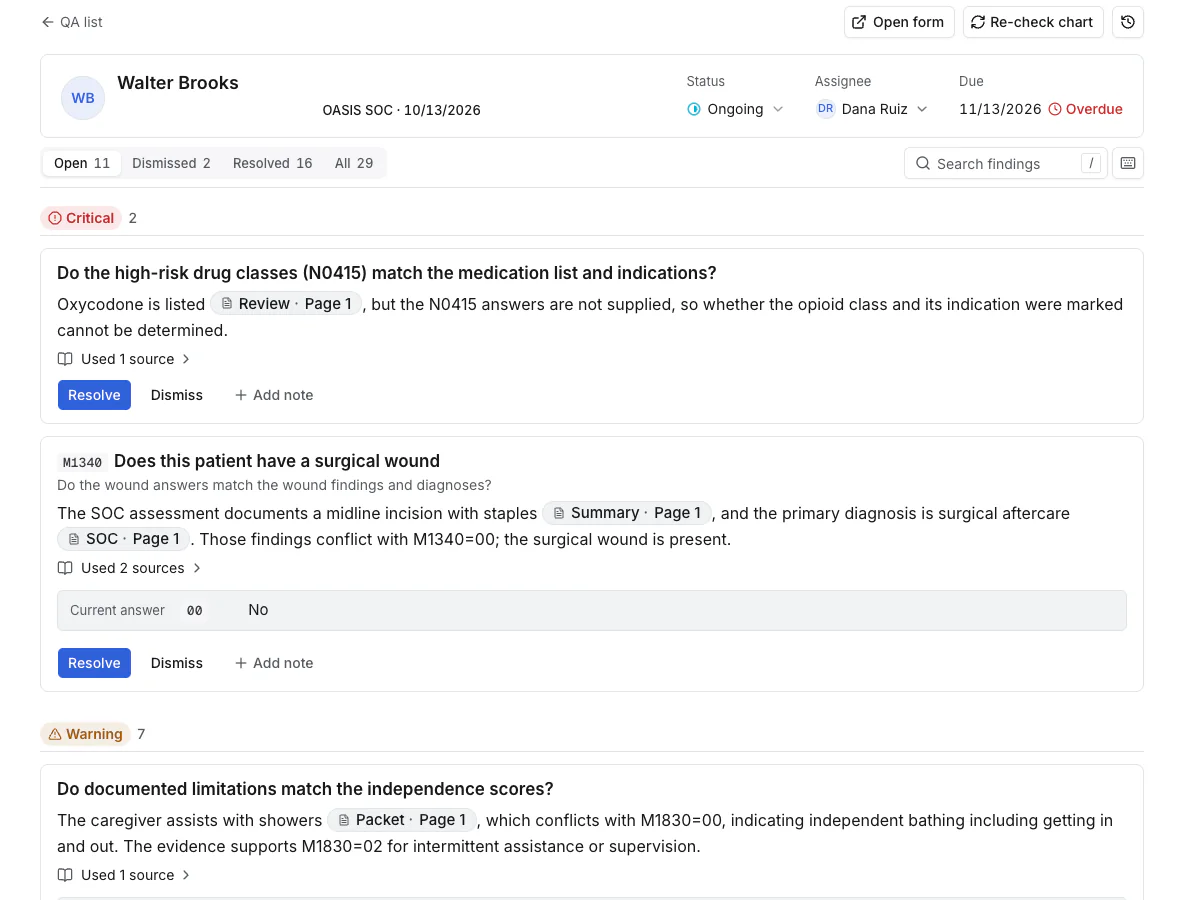
In this sample start of care, M1340 says the patient has no surgical wound. The assessment documents a midline incision with staples, and the primary diagnosis is surgical aftercare. Super Scrubber flags the conflict as critical and cites both sources.
Findings sort by severity: critical, warning, info. Your reviewer resolves or dismisses each one and adds a note. Where the chart lacks the evidence, the finding says so instead of guessing.
Evidence
Every claim links to the page it came from
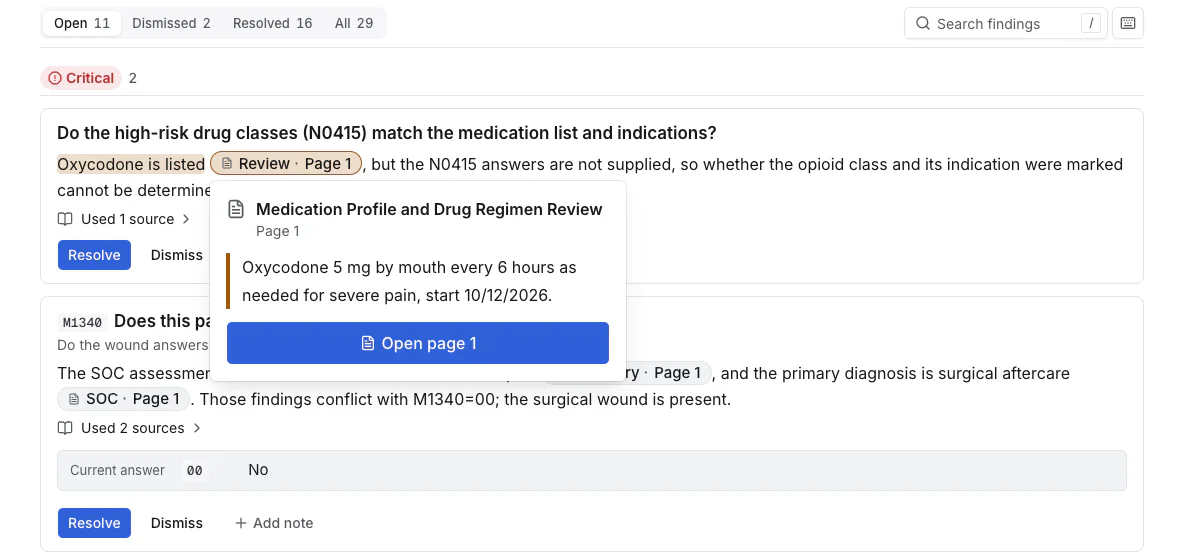
The medication profile lists oxycodone 5 mg every 6 hours as needed. The N0415 high-risk drug answers do not account for it. The reviewer clicks the citation, reads the quoted line, and opens page 1 of the document.
Super Scrubber reads scanned and faxed pages with OCR. A hospital discharge summary or a referral packet counts as evidence, the same as a structured field.
Rules
Your rules, in plain language
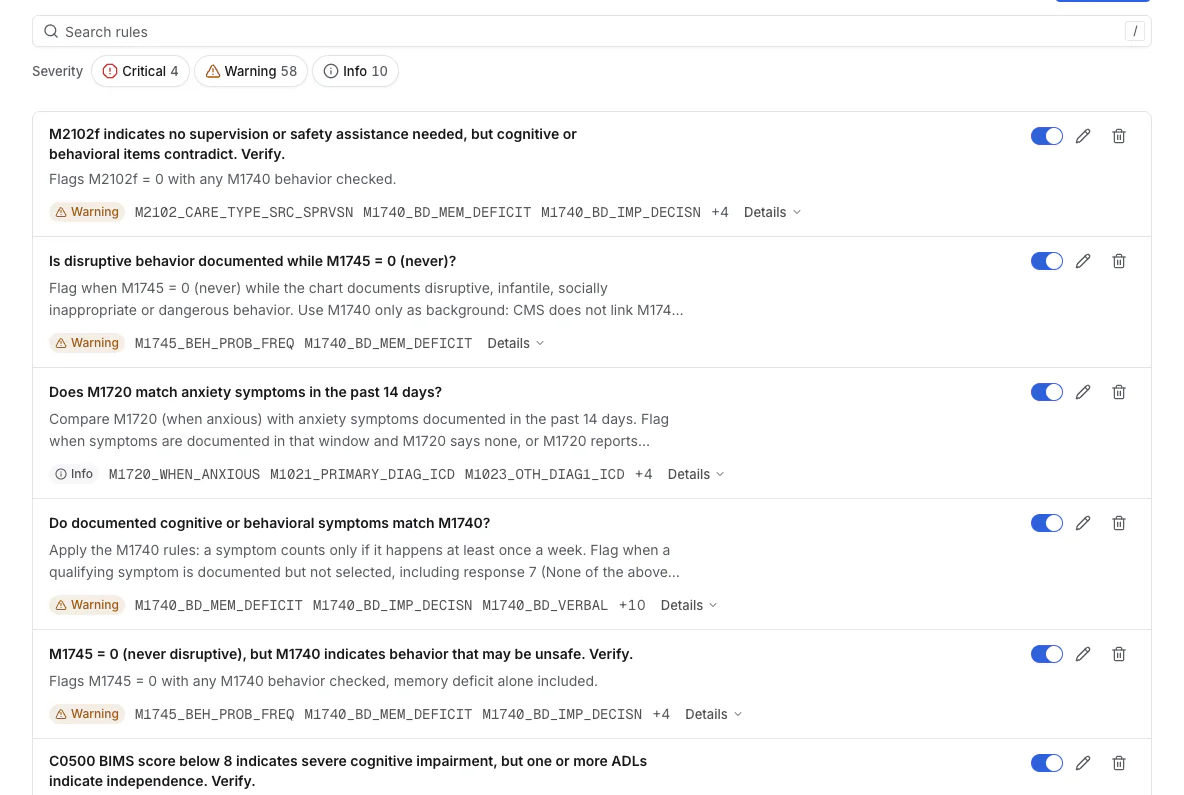
Each form carries its own rule set. The sample RN start of care runs 72 rules: 4 critical, 58 warnings, 10 info. You switch a rule off, edit it, or add one.
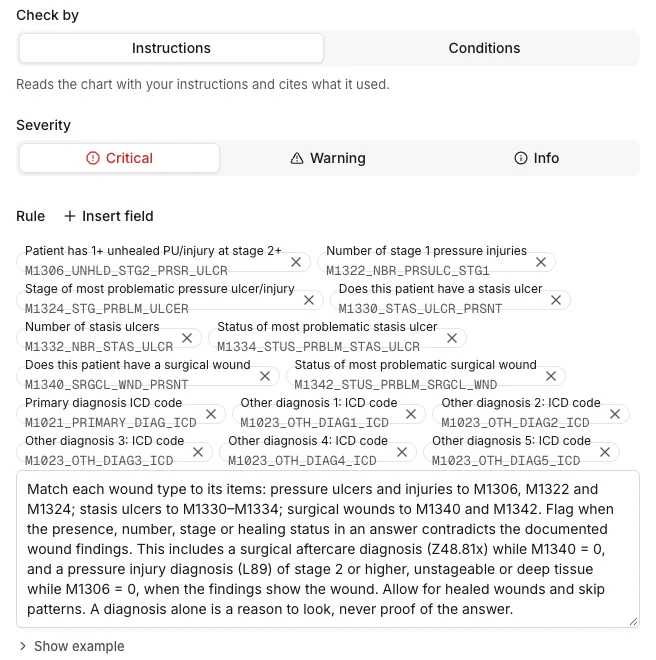
A rule is a written instruction or a set of field conditions, tied to the OASIS items it covers. The wound rule here tells Super Scrubber to match each wound type to its items and adds one caution: a diagnosis is a reason to look, never proof of the answer.
Re-checks
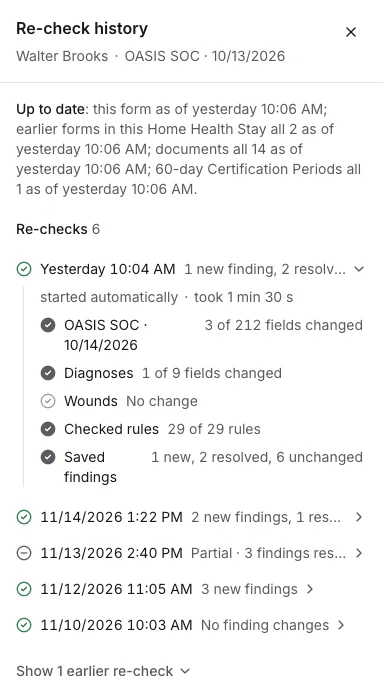
The clinician fixes the chart. Super Scrubber checks it again.
The sample re-check started automatically. It found 3 of 212 fields changed, ran all 29 rules for the assessment, resolved 2 findings, and raised 1 new one. The history records each pass.
Queue
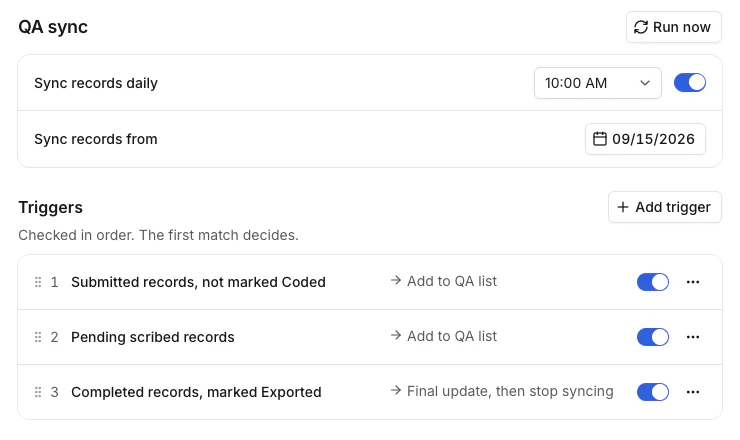
You decide which records get scrubbed, and when
Records sync on a daily schedule or on demand. Triggers run in order: submitted records not yet coded enter the QA list, and so do pending scribed visits. Completed and exported records get a final update, then stop syncing.
Each review carries a due date. You set the window in days, skip weekends, and export SLA results.
How Super Scrubber Differs From SHP
SHP is the scrubber most agencies know. It works from the OASIS data in the EMR: it compares answers to each other and to expected patterns, and it benchmarks your agency against national data.
Super Scrubber takes in more of the chart. Much of the evidence behind an OASIS answer never reaches a structured field. It sits in documents: a faxed referral, a hospital discharge summary, a medication profile, a wound record. Super Scrubber reads those documents, with OCR for scanned pages, and checks the answers against them.
| Super Scrubber | SHP | |
|---|---|---|
| What it reads | The assessment plus the documents in the chart: referral packet, hospital summaries, medication profile, orders, wound records, prior notes | Assessment and claims data |
| Scanned and faxed pages | Read with OCR and cited by page | Outside an OASIS data scrub |
| What a flag looks like | The question, the current answer, the quoted evidence, and the answer the evidence supports | An alert on inconsistent or outlier answers |
| National benchmarking and CAHPS surveys | No | Yes |
SHP details reflect its public positioning as of November 2026. Confirm current capabilities with SHP. Full comparisons: Lime vs SHP and Lime vs PPS Plus.
Built only for post-acute care
Chart audit platforms such as Brellium serve many specialties: ABA, behavioral health, primary care, cardiology, pain management. Lime builds for home health and hospice and nothing else. The rules start from OASIS items, PDGM payment logic, and the documents a home health chart holds, not from a general template. See Lime vs Brellium.
See it on one of your own charts
Book a 25-minute demo. We run Super Scrubber on an OASIS assessment live and walk through each finding and the page behind it.
Request a DemoCatch Billing Errors Before the Claim
OASIS answers and diagnoses feed the PDGM payment grouping. The functional items M1800 to M1860 and M1033 set the functional impairment level. The principal diagnosis sets the clinical group. An answer the chart does not support is a payment error waiting for an audit.
In the sample review, M1830 says the patient bathes independently. The referral packet says a caregiver assists with showers. Super Scrubber flags the conflict and names the answer the evidence supports. Your clinician confirms the change before the assessment locks.
- Functional items. M1800 to M1860 answers checked against documented limitations and caregiver help.
- Wounds. Pressure injury, stasis ulcer, and surgical wound items matched to wound findings and diagnoses.
- Medications. N0415 high-risk drug classes matched to the medication list and indications.
- Diagnoses. Primary and secondary diagnosis codes read against the assessment and the supporting documents.
- Cognition and behavior. BIMS, M1700 series, and behavior items checked for agreement with each other and the chart.
Less Chart-Opening for the Back Office
A manual OASIS review means opening the assessment, then each attached document, then cross-reading by hand. Reviewers spend 20 to 40 minutes on a chart, so most agencies sample. Super Scrubber does the reading on every assessment and hands your reviewer the short list of answers needing a decision.
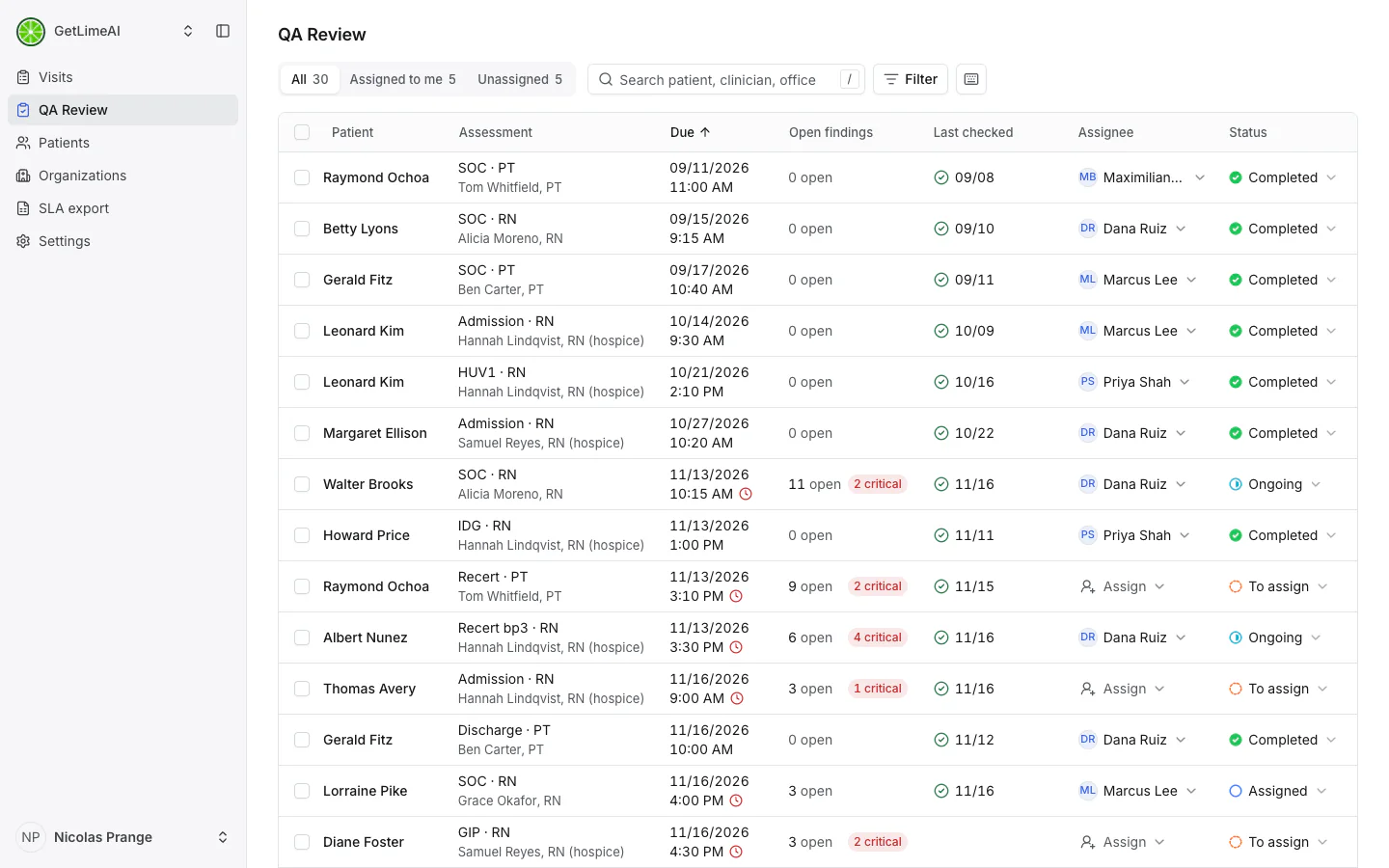
- One worklist. Filter by status, assignee, assessing clinician, timepoint, due date, or findings.
- Clear ownership. Each review moves from to assign, to assigned, to ongoing, to completed.
- Due dates. Set how many days a review has before it is late, skip weekends, and export SLA results.
- A record of decisions. Resolved and dismissed findings stay on the review with their notes.
Nothing changes for clinicians in the field. They submit the assessment the way they do today.
Start With a Pilot
You prove Super Scrubber on your own charts first. Access is read-only. It reviews the same assessments your QA team reviews, and your reviewers grade its findings against their own. Pricing is per review, not per seat or license. It works with HomeCare Homebase, WellSky, KanTime, Netsmart, and MatrixCare.
Hospice team? See Hospice Super Scrubber. Comparing vendors? Read the home health QA software guide or the Super Scrubber overview.
FAQ
Home Health Super Scrubber, Answered
What QA directors and billing leads ask before switching scrubbers.
Home Health Super Scrubber is Lime's AI OASIS scrubber and chart review for home health agencies. It checks every OASIS answer against the documents in the chart, including the referral packet, hospital summaries, the medication profile, physician orders, and wound records. Each finding shows the current answer, the evidence, and the page it came from. Your QA team works the findings in one list.
SHP scrubs the OASIS data in your EMR and benchmarks your agency. Super Scrubber reads the OASIS data plus the documents attached to the chart, where most of the supporting evidence sits. It reads scanned and faxed pages with OCR, so a hospital discharge summary or a referral packet counts as evidence. Each finding quotes the passage and links to the page. Lime does not benchmark or run CAHPS surveys, and many agencies keep SHP for those.
Brellium is a chart audit platform serving many specialties, including ABA, behavioral health, primary care, and cardiology. Lime builds only for home health and hospice, so Super Scrubber's rules start from OASIS items and PDGM. PPS Plus provides OASIS analysis and benchmarking built on OASIS data. Super Scrubber also reads the documents in the chart and cites the page behind each finding.
Start of care, resumption of care, recertification, and discharge assessments, across nursing and therapy disciplines. Each assessment type carries its own rule set, and you switch rules on or off per form.
Yes. Super Scrubber uses OCR to read scanned and faxed pages in the chart, such as referral packets and hospital records. Findings cite the document and the page number, and your reviewer opens the page in one click.
OASIS answers and diagnoses feed the PDGM payment grouping. The functional items M1800 to M1860 and M1033 set the functional impairment level, and the principal diagnosis sets the clinical group. Super Scrubber flags answers the chart does not support before the assessment locks, so the claim rests on documentation an auditor will accept. Your clinician confirms every change.
Yes. Your QA team assigns each review, then resolves or dismisses each finding and adds notes. Super Scrubber does the reading. Your reviewers make the calls.
Super Scrubber re-checks the chart. The re-check history shows which fields changed, how many rules ran, and which findings are new, resolved, or unchanged. You start a re-check by hand too.
Yes. Each rule is a plain-language instruction or a set of field conditions, tied to the OASIS items it covers and given a severity of critical, warning, or info. Lime loads a starting rule pack and your team edits it.
Yes, for visits documented with Lime's OASIS Scribe. Super Scrubber compares the assessment to the recorded visit conversation. Your rules decide which sources count for each item.
Super Scrubber works through the EMR access your back office already has, with no integration project. It works with HomeCare Homebase, WellSky, KanTime, Netsmart, and MatrixCare.
Per review. You pay for QA performed, not per seat or license. Agencies start with a pilot before committing.
Built by the team behind the scribe agencies trust with tens of thousands of patients monthly







See Super Scrubber review one of your OASIS assessments, live.
Request a Demo